Sticks with multiple hardware Rabbets
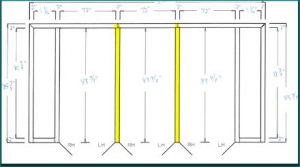
Elevations that require hardware preps to be placed on more than one rabbet include communicating frames in which a door is placed on both sides of a double rabbet jamb, and frames with multiple door openings where a mullion has doors both to the left and to the right, as in the elevation with the double sided mullions pictured blow:
Automatic Tooling With Custom Shapes
The Digital Resources System is designed to tool parts completely automatically, even when the use of custom tooling shapes is required. The system can be trained to use any arbitrary shape appropriately.
Here we see an overview of a hinge jamb produced in a turret with limited tooling including very custom shapes.

Three special cases are show. A special miter tool used to punch the miter and a portion of the rabbet. This tool is asymmetrical and its center is offset, yet it is automatically used exactly as desired. A special tab tool is used to punch the complete tab and a portion of the base lines. And, due to limited tooling, a round hit is used to approximate the 45 degree chamfer.

The use of these special tools, and the jagged shape of the area being punched, leaves a scrap remnant whose odd shape is handled efficiently by the system’s scrap removal.

Variables added to engineering processing
A set of variables storing the names of specification sets associated with line items in the engineering system are now available for referencing during processing.
New Function For Database Queries
The DRI functional language has a new built in function. It accepts a path to a database and a SQL statement. The sql statement should return a record with one or more fields.
The function will create a variable with the same name and value of each field in the record. The variable names may be given an optional prefix to avoid conflicts with existing variables or keywords.
This command supports communication among the various modules of the system.
avoiding interference with other features and preps when placing preps
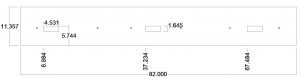
The Ordermation™ engineering system has a powerful function allowing the placement of preps while automatically detecting and avoiding other preps, the +FDRAWAVOIDING command
All of the four following drawings have countersunk mounting holes placed with the exact same command. The holes are placed differently depending on interference:
Hinge Jamb with no interference:
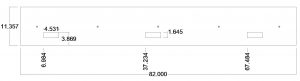
Hinge Jamb With Interference:
Using all tools on one edge before using them on the other
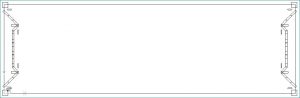
In a turret punch press, it is often fastest to make all hits with a given tool before changing to another tool. There are circumstances where it is necessary to override that behavior, such as when rapid travel from one edge of a long part to the other could dislodge a piece of scrap held on by micro-joints.
In the Digital Resources’ system, all tooling is done completely automatically. This example shows how we set up a rule for detecting when this tooling order is needed, along with a rule for applying the tooling order.
Controlling the Group (Assembly Sheet) Number
By default, Ordermation numbers the groups of products that are combined on one shop traveler document in the order in which they are processed. The order in which products are processed can be controlled by adjusting the GROUPING QUERIES. The GROUPING QUERIES are used to select products with similar enough properties to be represented on the same shop traveler from the opening schedule.
There are cases were a different numbering system is desired.
For example, a customer does not want different line items to be combined into groups. The customer wants each line to be in its own group and have its own assembly traveler sheet. (more…)
Integrated Communications and modern Telephony
- Many customers are paying their cable, internet or phone companies $30/per month for each line. I recommend you switch to Office 365 with phone system and calling plan. It will cost you no more (it will probably save you money), and will provide a very substantial group of features that will enhance the productivity of your team noticeably.
Office 365 Pooled Phone Plans
Office 365 offers a powerful telephone system that is fully integrated with the rest of its productivity and collaboration features, including the exciting TEAMS functionality.
To enable communication with people outside your organization and connected to the conventional phone system, Microsoft offers Calling Plans. These calling plans are dedicated to individuals, not organizations. If a company has 20 people that need to communicate with outsiders, then 20 calling plans would be required. For companies where each member needs this capability regularly, like a call or support center, this can make economic sense as the cost of the plans are reasonable.
But in many companies, only a percentage of members are communicating with outsiders at any given time, even though many or all may need to occasionally do so. Historically, companies pooled outside lines. A given number of lines went into a switchboard, and a greater number of internal extensions to the switchboard shared these lines. The maximum number of simultaneous conversations with the outside world was limited to the number of pooled lines.
Microsoft has now extended the possible configurations of outside lines to offer the best of both worlds – unlimited simultaneous connections outside of the organization without requiring a per individual calling plan. This is made possible with Direct Routing. Direct Routing requires dealing with third parties, and not all configurations of direct routing offer all the advantages, and price structures can vary dramatically.
Digital Resources, Inc. has been advocating to make the significant benefits of Office 365 cloud based telephony affordable for companies that fit the profile described above. We have established relationships with the best in class providers of Direct Routing services, and understand how to optimally configure the offerings for different organizational structures.
Please contact us for a individualized analysis.
David Reed
718 230 5000