Anchor Parts
Anchor definitions can have hardware sets associated with them. These hardware sets describe actions, such as preps that need to be applied to the components the anchors are for. It is now possible to associate a bill of materials with these sets so that part quantities and details can be calculated and parts can be drawn, programmed and nested as necessary, and or added to documentation and purchase orders.
More Options on Opening Schedule

Our Opening Schedule for hollow metal products has more entries offering more options on every line item. We now offer specification of different faces, profiles, anchoring methods, wall conditions, and sections for all four standard framing components – typically the head, hinge jamb, inactive hinge jamb for single swing and strike jamb for pairs, and sills.
Frame, window and door assemblies will adapt as necessary to reflect these settings, so every master definition can be used in many different contexts.
Of course, every component in a more complicated assembly with an arbitrary number of parts can have these settings changed in the assembly variant screen.
Expanded Anchor Definitions
This document explains the expansion of Anchor definitions. Anchors may now be associated with any stick (component) in an elevation (frame). Default anchor assignments can be made at the elevation master level. Overrides can be made at the elevation variant and order form line item levels.
The order form used to allow anchor assignments for the hinge and strike or inactive hinge jamb. Now it also provides for defining anchors for the Head and Sill.
Anchor Components such as Straps and Covers
This document shows how extra components that are associated with anchors, such as straps, brackets, and covers, can be automatically generated, documented and fabricated simply by selecting the anchor.
Hollow Metal Data Entry – Virtualized
Digital Resources is exploiting rapid technological developments to benefit its Architectural Hollow Metal Products customers. We are creating an entirely new generation of web based forms and reports, but this article explains how we using new cloud offerings from Microsoft to deliver many of the benefits of new architectures to our customers enjoying the performance, comprehensiveness, reporting power and flexibility of desk top implementations.
Azure is Microsoft’s offering for delivering cloud based (off-premises) computer services to customers. It has many options, including database, domain administration, storage and backup, and much more. Virtual Machines allow one to create and use computers that are accessed remotely as needed.
Microsoft 365 is a new subscription product that includes the substantial capabilities of Office 365, adding security, operating system and other benefits.
With a suitable Microsoft 365 subscription, one can deploy any number of a new Azure service called Multi-User windows. Each instance has its own Windows 10 Enterprise based personal computer installed with the latest 64 bit Office 365 applications. You do not need to buy individual licenses for Windows or Office for each instance.
We have updated our Office based data entry products to work in this environment. We can create a base instance for a customer that can then be copied and individualized on a user, or even a job by job basis.
Any computer – even a Mac or Chrome based system – with an internet connection and a browser can access interact with the virtual computer. The power is provided in the cloud. Therefore, on-site computers can be totally generic and require no special installation.
And since the computers are cloud based, they can be accessed from anywhere – and we can easily collaborate with you in the support.
We are exploring the possibility of virtualizing processing servers – the computer the reads the opening schedule and generates bill of materials, drawings, flat layouts, and other documents. However, in the meantime, we have added the ability to release a job from the virtual computer in the job to a processing queue hosted either on our customer or our premises.
This new virtual offering will greatly simplify the management, deployment and scaling of the Digital Resources Desktop system, and will significantly extend the useful life of this incredibly productive application.
Sticks with multiple hardware Rabbets
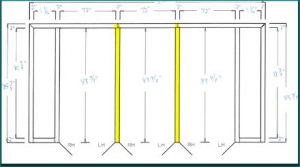
Elevations that require hardware preps to be placed on more than one rabbet include communicating frames in which a door is placed on both sides of a double rabbet jamb, and frames with multiple door openings where a mullion has doors both to the left and to the right, as in the elevation with the double sided mullions pictured blow:
Variables added to engineering processing
A set of variables storing the names of specification sets associated with line items in the engineering system are now available for referencing during processing.
New Function For Database Queries
The DRI functional language has a new built in function. It accepts a path to a database and a SQL statement. The sql statement should return a record with one or more fields.
The function will create a variable with the same name and value of each field in the record. The variable names may be given an optional prefix to avoid conflicts with existing variables or keywords.
This command supports communication among the various modules of the system.